 for the list of limitations).
| Updated 27-Aug-2008 14:20:32 PDT by TomMueller |
The supported operating system list must include Linux, Windows, Mac OS, and Solaris 9 & 10 (See requirement Overall-1.1 for the complete list). The scope of the port includes the IPS client and server, as well as the build infrastructure for the IPS source base, such that is buildable and testable across the supported platforms. In addition, existing unit, functional, and regression tests must be ported, both in language (e.g. ksh) and functionality (e.g. not assuming a unix environment, such as the presence of /usr/bin/ls).
Certain IPS features have a strong dependency on Solaris. This project includes redesigning the features to allow alternate implementations, but it does not include the actual design and development of the alternate implementations. An example of one of these features is the use of the ZFS file system by IPS.
IPS feature additions needed by Update Center include:
More information about these features is provided in section 4.6.
Since many products that will be using Update Center are Java-based, the Update Center project provides a Java API for IPS that includes the ability to bootstrap the platform-specific python IPS implementation using platform-independent Java code.
The major components of this project include:
The Update Center GUI FSD identifies the following data model requirements for IPS:
There are additional elements that are identified as TBD that might make this list longer. For each of these items, this design must show how this information can be obtained for use by the UC GUI.
The IPS subsystem is currently implemented in Python. However, many of the SWI products that will use the Update Center toolkit depend primarily on Java without any use of Python. While the initial focus of this effort is to make Python and the IPS implementation in Python available for use in the required environments, the longer term design must consider the following:
This project includes an initial implementation of a
Java API for IPS. However, this implementation contains significant
limitations (see the javadocs for the list of limitations).
The figure below shows the components in this design and how they are related to one another. The yellow boxes represent the software that is part of this design. The remainder of this section describes each of these components with more details for some of them being provided later in the document.
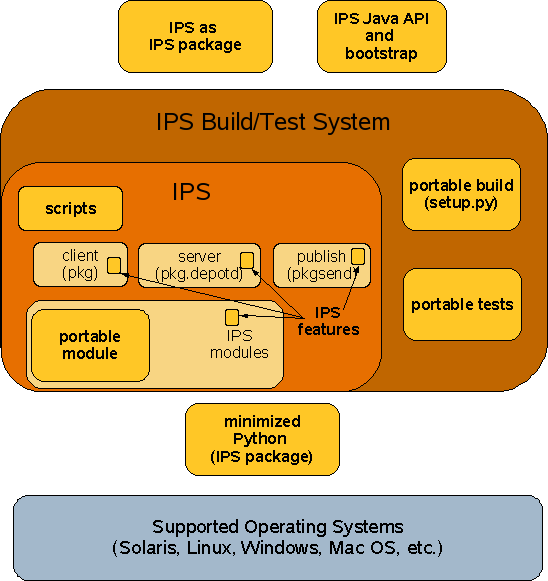 |
The "portable module" is a Python module that provides an abstraction for those operating system functions that are not already portable within the standard Python libraries. This module is described in detail in section 4.1 below. The IPS client, server, and publish commands and the various other modules that they use are modified to make use of the portable module rather than calling Solaris-specific operating system functions.
Some parts of the IPS code are truly Solaris specific and are not modified by this design. These parts include:
The limitations of the IPS port for other platforms include:
The "scripts" box represents operating system specific scripts for running the three IPS commands, pkg, pkgsend, and pkg.depotd. On Solaris, the Python scripts use the "#!" notation at the top of the file to cause Python to be automatically invoked to run the scripts. However, on other operating systems, either that mechanism is not available or the python command is in a different location than for Solaris, so a shell script or batch file is needed to run the Python script.
The initial IPS build system is based on Makefiles and the make command. Since make is not available natively on Windows and since this is a Python project, this design introduces the use of the Python distutils library and a setup.py file for doing the IPS build. This build mechanism, represented by the "portable build" box, is portable across all of the platforms where IPS will be built and tested. The transition to using setup.py will be gradual and will not fully occur until after the February OpenSolaris preview release. Eventually, the intent is that the Makefile based build would be removed entirely. More details about the the portable build system are available in section 4.2.
Associated with the portable build system is the "portable tests" module. The initial IPS unit test system is partially based on ksh, which is not available natively on Windows. To permit unit testing on all supported platforms, the unit tests driven by ksh will also be converted to python. Also, the portable tests module includes use of the pylint tool to provide a check as to whether non-portable APIs are being used within the IPS code.
The software for all of the modules described so far reside within the source base for IPS itself.
In order to run the IPS commands, a Python run-time environment is required. On OpenSolaris-based distributions, an appropriate version of Python will always be available. However, on older Solaris versions, such as Solaris 9, or on some versions of Windows or Mac OS, Python may not be there at all, or the version of Python that is there may be too old. See reference #3. Therefore, this feature must provide for getting a version Python on the system. A complete Python distribution is about 35MB and includes much software that is not needed in order to run the IPS commands. To minimize the download and install overhead associated with obtaining Python for IPS use, this design provides for a minimized Python distribution that only includes the files that are actually needed by IPS and the tools that are part of Update Center. See section 4.4 for details on the minimized Python. This minimized Python is packaged in IPS package form so that it can be updated using the IPS tools if necessary. However, the initial download for the minimized Python will be provided by the "IPS bootstrap" module.
The IPS software itself is also packaged into IPS package form so that it too can be updated by the IPS tools.
Generally, there are two ways to get the IPS software and Python onto a target system that doesn't already have it. The Update Center user documentation contains a flowchart that shows how these images can be assembled.
Platform Specific Install Image
With a platform specific install image, preinstalled versions of the IPS software and the minimized Python are included in the image that is initially downloaded by the user. In this case, there isn't any need for the "IPS bootstrap" module. However, a different install image for each platform must be made available to the user for the initial download.
Universal Install Image
With a universal install image, the initial download image only includes the software that is portable. The installer provides a hook to the "IPS bootstrap" module which then downloads and installs the platform-specific parts of the minimized Python (using special bootstrap code, see section 4.5 for details) and then IPS itself is used to download and install the platform-specific or other remaining parts of the Update Center tools. This type of image is planned for Glassfish V3. The figure below shows a diagram of this process.
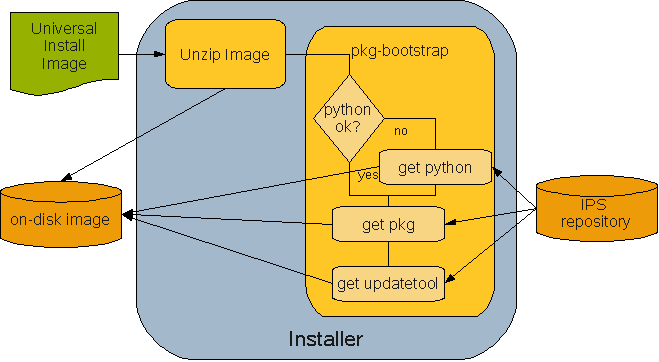 |
The IPS bootstrap interface is a Java program that can either be called by an installer or manually by the user. The IPS bootstrap module also includes wrapper scripts for the pkg and updatetool programs that can be put on the system before the tools are actually there. When run, they tell the user that the software for these programs is not yet installed and offer to run the IPS bootstrap program to download the software from a repository.
The IPS bootstrap program leverages a Java API for IPS. This API can also be used by Java-based applications to directly manage an installation image without using the python IPS code.
The final part of this design is a set of miscellaneous enhancements to IPS that are needed by the Update Center project. Section 4.6 provides details about these features.
| Interface Name | Proposed Stability Classification | Specified in What Document? | Former Stability Classification or Other Comments |
|---|---|---|---|
| python | External | python.org | |
| python distutils library | External | http://www.python.org/doc/2.4.1/dist/dist.html | Used by setup.py |
| operating systems (Windows, Linux, etc.) | External | - | |
| OpenSSL | External | http://www.openssl.org/ | Used to provide SSL functionality needed by python libraries |
| Java SE 5 | External | http://java.sun.com | Used for bootstrap code |
| Apache Ant Tar Tools (org.apache.tools.tar) | External | Source code embedded within project | See OSR #8716 |
| IPS Internals | Private | IPS Source Code | The Java API for IPS depends on meta data file formats and protocols that are defined by IPS. These are currently only defined within the IPS Python source code. |
| Interface Name | Proposed Stability Classification | Specified in What Document? | Former Stability Classification or Other Comments |
|---|---|---|---|
| portable package | Consolidation Private | See IPS source: src/modules/portable | Private to the IPS project |
| setup.py python file for build | Consolidation Private | See IPS source: src/setup.py | Private to the IPS project |
| pkg | Uncommitted (see comments) | * pkg(1), the retrieval client, * pkgsend(1) , the publication client,* pkgrecv(1) , the publication client,* pkg.depotd(1M) , the depot server | These are the documented pkg interfaces from the PSARC/2008/190 case. This project provides shell script and BAT file wrappers for these programs that provide the same interface but they locate the python executable. |
| pkg | Committed | this document IPS package for all platforms containing complete IPS binary | |
| pkg-java | Committed | this document | IPS package for the Java API for IPS |
| python2.4-minimal | Committed | this document | IPS package for minimized python binary |
| pkg-bootstrap.jar | Committed | Multi-platform IPS Toolkit Initialization Specification | Java program for starting the IPS bootstrap process |
| pkg-client.jar | Uncommitted | Javadocs | Java API for IPS client functionality |
| pkg-bootstub.bat / pkg-bootstub.sh | Committed | this document | Wrapper scripts to provide link between pkg/updatetool commands and pkg-bootstrap.jar |
User interfaces include the following:
. It includes both the build and unit test functions. See section 4.2 and 4.3 for details.
These key interfaces affect compatibility and interoperability:
In each of these cases, one or both of the parties that communicate across the interface are expected to be able to change independently from the other. Therefore, it is essential that appropriate versioning and compatible change control be used to allow compatibility and interoperability to be maintained.
Performance validation work for the IPS repository server is being tracked in a separate Performance page.
Mention the multi-platform behavior here given lack of ZFS on other systems. (TODO - Still need to investigate this).
Talk about the use of OpenSSL here. (TODO - still need to investigate this)
2.8.1 Namespace Management
The following name spaces are effected by this design:
2.8.2 Dependencies on non-Standard System Interfaces
Talk about the use of SSL here for packaging signing (TODO - need to investigate this)
Much of the operation of this design is either part of the build process or the logic is embedded into the operation of other components such as IPS. The one exception is the IPS bootstrap component which is described in section 4.5.
The components of Update Center IPS client infrastructure will be packaged and distributed as individual IPS packages. These IPS packages will be made available through an IPS-based package repository. In order to enable 'first time' install on systems where there is no IPS client environment, the update center IPS client infrastructure will also be made available for use in a 'pre-installed' image archive.
This section outlines the design involved in packaging and distribution of IPS client infrastructure.
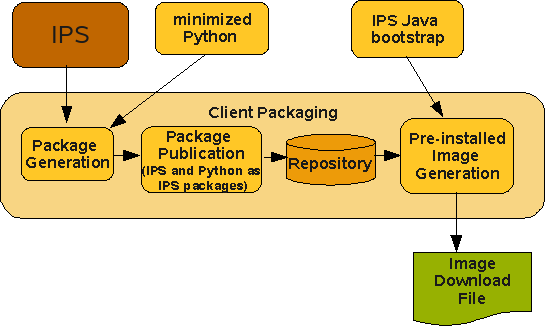 |
This process makes use of the binaries of IPS and minimized python resulting from the IPS build System.
1) IPS Binary
The IPS binary is the result of building IPS from source. This binary is published to an Update Center maven2 repository using instructions in the external/ips subdirectory of the Update Center 2 source code repository.
This process results in one IPS JAR file for each of the supported OS platforms. The Update Center build process then downloads the appropriate JAR file to create the IPS packages for IPS.
2) Minimized Python
The complete Python distribution is about 30-35MB. However, the parts of Python that are actually needed to run the IPS client and the Update Center GUI are much smaller than this. The modulefinder.py tool is used to determine what parts of Python are actually needed and then additional manual modifications are made for cases where the tool does not correctly detect dependencies. As with the IPS binary, instructions for publishing the binary to the maven2 repository are in the external/python} subdirectory of the Update Center 2 source code repository. This process results in one python JAR file for each of the supported OS platforms. The Update Center build process then downloads the appropriate JAR file to create the IPS packages for minimized python.
The IPS packaging for both IPS and minimized python is accomplished by the ant-based build.xml file and a tools/makepkgs.py program that is part of the Update Center 2 build environment. This build script is responsible for making and publishing the IPS packages for the given binaries.(e.g IPS, Minimized Python, etc). The whole process of generating and publishing IPS packages is done in 2 stages:
(i) Package Generation
This phase takes the given input binaries from the maven2 repository in JAR file format and extracts the files into a dist area that mimics the file system layout for the target system. The dist area is fully executable for testing purposes.
(ii) Package Publication
This phase takes the dist area and prototype files that are input to the makepkgs.py script and runs the makepkgs.py scripts to create and publish IPS packages in a repository. The makepkgs.py script runs the IPS repository server in a thread. The makepkgs.py script also has the ability to publish the packages to a remote repository server.
The whole process of making and publishing IPS packages is done in 2 stages primarily for the following reasons.
(iii) Pre-installed Image Generation
This phase takes care of generating a preinstalled image containing IPS client and minimized python in IPS package form. Given a repository that was generated from the previous step and a list of packages, the makeimage.py utility creates a user image and installs the packages from the given repository. Then the build script generates a zip archive of the installed image that is distributable. The generated preinstalled image may be utilized by the install application in order to lay down the UC client environment on the system during initial install. Alternatively, the preinstalled image may be exposed to the end user directly where they can just download the preinstalled image archive and extract it on the system to get the IPS client infrastructure up.
3.1.1 Package Overview
This project delivers the following IPS packages:
Each of these packages is published into platform specific repositories for the following platforms: sunos-i386, sunos-sparc, linux-i386, windows-i386, darwin-universal. The pkg-java package is platform-independent and is only published once and then copied to the various platform-specific repositories.
This project delivers the following pre-installed image archives of IPS client infrastructure in order to facilitate 'first-time' install.
This project delivers the following independent files:
3.1.2 Installation Locations
IPS client infrastructure will be installed under the user choosen installation home. Relative to the install home, the components of IPS client will be laid out as follows:
The IPS client infrastructure can be installed in the following ways:
1) Using IPS client tool
This is useful on the systems where the working version of IPS client is already available. Users can create a user-image and install the required IPS client packages from the appropriate repository using IPS client commands.
$ pkg image-create -U -a sun.com=$REPOSITORY_URL $INSTALL_HOME
$ cd $INSTALL_HOME
$ pkg install pkg
2) Using pre-installed Update Center Image
This is useful on systems where there is no IPS client environment. This refers to 'first-time' installation scenario. In this case, users can download the pre-installed update center client image and extract it under some install home.
3) Using the installer application
This is useful on systems where there is no IPS client environment. This refers to 'first-time' installation scenario. In this case, users can download the product distribution and run the installer application that comes with the product distributions. The product distribution may choose to include the pre-installed update center client image as part of the distribution and the installer application can install this pre-installed image on the system during the course of installation. An installer application is not provided by this project.
This section contains more details on some of the components in the architecture.
The Python portable package is added to the IPS system to represent methods that need to vary between the different supported operating system platforms. The figure below shows the layout of the Python modules within the portable package.
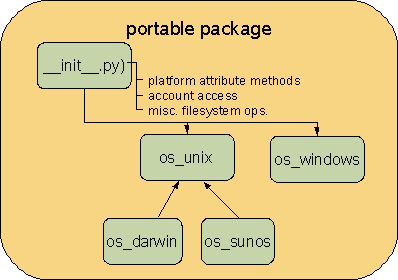 |
The module initialization code in init.py defines the interface to the methods that are used by IPS that need to be platform specific. The remaining classes in the diagram (os_unix, os_darwin, etc.) provide the platform specific implementations for those methods. For Unix platforms, most of the implementation is in os_unix module with variations for SunOS and MacOS (darwin) being provided by subclasses. Linux systems use the os_unix class. The init.py file determines the appropriate operating system specific module to import. The names from the selected module are imported directly into the portable namespace so that the methods can be accessed as if they were defined by the portable module.
The following high-level groups of methods are defined in this module:
The IPS code is modified throughout to use the methods from the portable package to access these platform-specific functions.
The portable package also includes a helper module, util, helping to determine which implementation class should be used.
Calling the portable module
Here is how the portable module is used by other modules within IPS:
import pkg.portable as portable
Then any of the methods from the module can be called as needed:
filter_tags = portable.get_isainfo()
The setup.py script will eventually replace the make-based system that is part of IPS currently. As described in the feature overview, setup.py uses the distutils mechanism that is part of the standard Python distribution.
The cmdclasses variable defines the various targets that are available. Each target name is mapped to a Python class that implements the action. The defined actions are: link, linkclean, install, build, bdist, lint, clean, clobber, test. These actions are defined so that they do the same thing as the corresponding make target.
To run the Python based build, a developer uses the following
python setup.py <target>
One of the setup.py targets listed in section 4.2 is the test target. This target invokes the Python-based unit test system. The IPS unit tests are currently defined as follows:
The Python-based test system (at this time) only runs the first of these for all platforms. The 2nd two are run on all posix platforms (Linux, Solaris) and the last one is only run on Solaris.
IPS team contact for unit testing: Dan Price
The minimized Python binary is the result of building a suitable version of Python and minimizing it. The minimized version of Python is made available for all supported OS platforms where the Update Center project decides to bundle python. This includes:
The bootstrap code (see section 4.5) will have the logic to determine whether the minimized Python is needed for a particular platform (This is not yet implemented).
The contents of the minimized Python is based on what is needed by IPS and the Update Center GUI including the components such as wxPython that are used by the UC GUI.
The Python modulefinder module,
a part of the standard Python library, is used to minimize python. The
input to this tool is the list of the entry points such as pkg, pkgsend, and pkg.depotd, as well as the files that are brought in via a dlopen
call. Modulefinder produces a list of modules that are referenced. This
list is converted into a script that is used to construct the minimized
Python.
The Python minimization build scripts also include the logic to build Python itself on the target platform, so that it is built on the oldest supported operating system version.
The IPS bootstrap component is a Java class, Bootstrap, with a main method that implements the logic to download the minimized python and IPS packages. It also has the ability to install the wxPython and updatetool packages. This class uses the Java API for IPS to install the various required packages as well as registering the updatetool notifier and setting the initial preferences for updatetool.
The Java API for IPS (pkg-client.jar) is a partial rewrite of the python IPS code into Java. Class and method names are made to follow the Java naming conventions. A list of limitations is maintained in the javadocs as the implementation is only a subset of the python IPS functionality. To perform tar file stream processing, the IPS Java bootstrap component makes use of files from the Apache ant project. Currently, the implementation is pure Java. In the future, the use of Jython should be considered so that the python IPS implementation could be reused in a Java environment.
The pkg-client.jar file is an OSGi bundle. The symbolic name for the bundle is "com.sun.pkg.client" and the bundle name is "pkg-client". The JAR file is published to the Java.net maven2 repository for use by other projects.
The list of features in the overview (section 1.1) needs to be tracked with the IPS project. As this happens, the results of the discussion will be recorded here.
BASEDIR
The purpose of a BASEDIR concept is to allow a package to be installed under different top-level installation directories. This is important for packages that are intended to be used both at the operating system level (installed under /) and within a user image. Consider a package foo that has two files, foocmd and libfoo.so that are installed in /usr/bin and /usr/lib respectively when installed in the global image. Within a user image, it may be desirable to eliminate the "usr" level and use "foo instead so that they are installed in foo/bin and foo/lib instead. In this case, we would have BASEDIR=foo rather than BASEDIR=usr. The BASEDIR concept is useful whenever all of the files from the package are installed in a directory hierarchy with a common root.
Status: This topic was discussed on the pkg-discuss alias on October 17, 2007. The reply from Stephan Hahn was that this feature is needed, but hasn't been designed yet.
package marshaling
Package marshaling could be useful in the following scenarios:
With these alternatives, it is not clear that the Update Center project really needs to have a package marshaling feature in IPS.
Status: this topic has been discussed extensively on the pkg-discuss alias, however, no conclusions have been made about the specific usage scenarios nor on specific formats.
download size
There already exists an API for retrieving package attribute values. However, the download size is not a package attribute, or at least it is not a static package attribute. The download size depends on the filter involved and on the software that is already installed on the system, including evaluation of dependencies that are needed. So obtaining this value is not a simple fetch of an attribute. The intent here is that this API would be developed within the IPS project, possibly by UC engineers, and would be used by UC. The IPS client already displays download size (in more recent builds), so IPS already has this capability. The goal here is to make the download size data available to the UC GUI.
Another aspect of this is to be able to display the size of an available package when it is displayed by the Update Center. Also, in the installed package list, the installed size needs to be displayed.
virtual packages
The idea behind a virtual package is to allow the package system to be used to represent groupings of related software. For example, an application component might be represented with 5 packages that each can be independently installed to obtain independent features of the application. A virtual package for the application might be defined that provides the ability to pick one package for installation and then all 5 of the applications packages would be installed.
With the IPS system, virtual packages can already be created by using the depend action which allows a dependency to be introduced from one package to another. In the example above, the virtual package would be a package just like any other with its only content being the dependencies on the other packages.
So isn't this enough? What is missing from this as a solution is that the Update Center GUI does not have anyway to distinguish a virtual package from any other package for display purposes. It may be desirable within the GUI to use some special icon or other graphic means to show virtual packages in a special way. Virtual packages could be used to define categories or package groups and in this case, the UC GUI would need to have a way to query the meta data about the package to find the list of dependent packages.
Status: This issue depends on the design of the GUI and whether this capability is really needed. As of 2/11/08, the view of the GUI design team is that this is not really needed.
multiple repositories
The IPS command line tools permit the definition of multiple authorities for an image, with one of them being the preferred authority.
The intent of the Update Center project is to support multiple repositories per image where different repositories have different service level agreements (SLAs), support levels, etc. This means that the UC GUI will need to provide the user with a means of identifying the repository for a package.
backout
Status: At a previous meeting with the IPS team, there was a suggestion to try installing a previous version of a package to do a backout.
configuration
The plan is to use package attributes to represent the configuration actions to take (see configuration FSD).
Bart Smalders has proposed a "post-run" action that would invoke some software functions once after the software has finished being installed. This might be implemented using SMF on Solaris. This might have to be ported to other mechanisms for other operating systems. This has not been designed yet.
filters for all actions
Bug 322 on IPS talks about filters not working for set action. The UC team would like to have filtering work for all actions.
The retrieval of the data elements will be implemented within a dedicated python module (ips client) with a set of functions (getters) that can be imported/called by the GUI.
| IPSenhancements.odg |  |
14367 bytes |
| IPSenhancements.png |  |
35349 bytes |
| IPSpackaging.odg | |
10981 bytes |
| IPSpackaging.png |  |
14813 bytes |
| portable.png |  |
10754 bytes |
| universal-image-install-process.png |  |
15793 bytes |


