Overview of Changes
- A REST style API was added to allow messages to be produced or consumed to the MQ provider
- A new bundling and layout scheme was added to support the product installed by our new Zip based installer (which will also be used in future releases for IPS packages)
- Minor administration changes
- Minor modifications to the windows installer
- Addition of a command to make it easier to locate the uninstaller on the OpenMQ packages.
Public interface changes
- New Exported Interfaces: Creation of the Universal Message Service (UMS) API:
- The UMS Protocol used by applications to connect to the service.
- The UMS Configuration which contains the set of configuration parameters for the service.
- A new war file (imqums.war) containing the servlet required by UMS.
- New Exported Interface: Creation of a the new filesystem layout for use by the new packages. This layout will also be used for our new install bundles specifically:
- Our OpenMQ product
- Our AIX product (the platform is new to 4.3)
- New Exported Interface: A new uninstall bat/shell script has been added as a shortcut for uninstalling the openMQ-only release.
- Modified Exported Interface: Minor changes have been made to JMX to add additional information for destinations and consumers.
- New Imported Interfaces: Installation of the product on windows (both for SJSMQ and OpenMQ) now uses Java registry keys as a fallback to locate a JRE to use to start the installer.
Private interface changess
Additional changes have been made to private interfaces:
- Modified Interface: Output of imqcmd. This interface is Uncommitted.
Descriptions of Changes
- Universal Message Service (UMS) - a REST style API
-
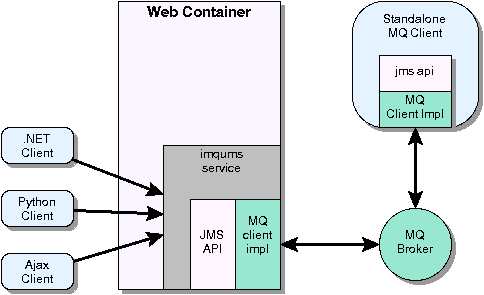
The Universal Message Service is a simple REST based API that allows any HTTP capable device to access Message Queue. This allows clients written in languages such as c-sharp and phython to send and receive messages.
A new web component (imqums.war) can be deployed on any web container. That component serves as a bridge between the ums client and the JMS provider. The ums client sends the ums protocol (which uses http posts) to connect to the imqums service. That service uses standard JMS apis to connect to the MQ server (the broker).
- Client->web component protocol
-
The protocol has two types of messages service requests (messages sent to the messaging system) and service responses (responses received from the messaging system). There are also two services (XML and basic text) which are provided in this release.
The API supports the following commands:
- login logs into the system and creates a UMS session (note: the password must be sent in plaintext since it is going as part of the http command line, however use of SSL is recommended).
- send Sends a message (which will become a JMS message) to MQ.
- receive Receive a message from MQ.
- commit Commit a transaction (provided the UMS session is transacted).
- rollback Rollback a transaction. (provided the UMS session is transacted).
- close Close the UMS session.
All messages are request/response:
- Service Requests
-
The http POST method is used for all interaction with the UMS. Each protocol message is represented with the following syntax:
http://host:port/<ums-context-root>/<service>[?<query_string_if_simple>];
Where:
- ums_conext-root: the location where the WAR file was deployed
- simple: the type of service used (simple or XML)
- query_string: used for the simple service. Provides a set of name value pairs separated by & which specify information such as the service type, messaging domain, and destination name
- For XML messages, the body contains the command information in XML format
- For the simple service, the body is empty (since the protocol information in in the URL)
- Service Responses
-
For the XML service, the body of the HTTP request returns a SOAP message containing return information. For the simple message service, the body of the message may contain some specific return information.
- UMS configuration
- When the war file is deployed, several configuration options are available for the servlet including password to be used to the broker, how often to poll for messages and the broker address. Specific configuration parameters are found in the UMS Configuration specification.
- Filesystem layout and packaging change - support for new packages which can handle multi-install
-
In MQ 4.3 we are adding a new zip based packaging bundle. In the following release (Crane), we will be replacing the zip bundles for IPS packages. This layout is the one we will be using for going forward for all future unbundled products (either zip based or IPS).
Note: Our current SVR4 or Linux RPM based packaging is unaffected by these changes.
MQ's filesystem will be laid out following the JES Filesystem Layout for Unbundled Software.
<install_home> | |-------- etc | | | |-mq [MQ etc files] | |-------- var | | | |- install [contains installer information] | | | |-mq [used by the server for storing data] | |-------- mq | |-------- bin [MQ executables] | | | | | |- sparcv9 (amd64) [64 bit solaris executables] | | | |-------- lib [MQ jar files and libraries] | | | | | |- sparcv9 (amd64) [64 bit libraries for the MQ C API] | | | |-------- include [C-API file system headers] | | | |-------- lib64 [note: linux libs used instead of sparcv9] | | | |-------- examples [demos] | |-------- install | |- open installer implementation and jar files - mquninstall[.bat] - script to improve uninstall experience
-
The installer places the script to uninstall the product in:
<install_home>/var/install/contents/mq/uninstallerA low level install script (used by the mq installer) is located at:
<install_home>/install/bin/uninstallerWhile we do document the location of the uninstaller, it is difficult to find and users often attempt to uninstall with the wrong uninstaller executable.
For this release, we are adding a new script (or bat file) called mquninstall that is being placed in the <install_home>/mq/bin directory. This will will only be in OpenMQ bundles for this release (it will not be available in package based installs).
- JMX Administration API changes - minimal JMX attribute and CompositeData changes
-
The following changes will be made to the JMX monitoring api:
- A new attribute NextMessageID will be added to consumers and destinations
- A new attribute NumMsgsPending to consumers
The specific changes are:
- DestinationMonitorMBean
New Attributes:
Name Set/Get Type Description NextMessageID G String JMS Message Id of the next message to be sent to any consumer - ConsumerMonitorMBean:
new Keys for Composite Data
Key Value Type Description NextMessageID String JMS Message Id of the next message to be sent to this consumer NumMsgsPending Long The number of messages which have been sent to this consumer but have not been acknowledged. They may either be queued for delivery or delivered to the consumer
- Administration API (imqcmd) output changes - imqcmd output changes for durable subscribers
-
Note: the output returned from this application has a classification of uncommitted.
This changes the output of the command imqcmd list dur to list all destinations (and include a directory name) if the -d is omitted. The following examples show the ouptut changes:
- Output when listing durables when a destination passed in on the command line. (Unchanged from previous releases)
imqcmd list dur -d mydest
Listing all durable subscriptions on the topic 'mydest'
on the broker specified by:

-------------------------
Host         Primary Port
-------------------------
localhost    7676

---------------------------------------------------------------------------
Durable Sub. Name   Client ID   Number of Messages   Durable Sub. State   -
---------------------------------------------------------------------------
mydn                mycid       0                    INACTIVE             -

Successfully listed durable subscriptions.
- Output when listing durables when a destination is not provided on the command line (adds new column DestinationName)
imqcmd list dur -- listing all destinations
Listing all durable subscriptions
-------------------------
Host         Primary Port
-------------------------
localhost    7676

------------------------------------------------------------------------------------------
Durable Sub. Name   Client ID   Destination Name   Number of Messages   Durable Sub. State
------------------------------------------------------------------------------------------
456                 123         *.foo              0                    INACTIVE
mydn                mycid       mydest             0                    INACTIVE

Successfully listed durable subscriptions.
- Output when listing durables when a destination passed in on the command line. (Unchanged from previous releases)
- Additional Installation Imported interfaces
-
The windows Installer.vbs script now uses the following variables to locate a JRE for the installer:
- HKLM\SOFTWARE\JavaSoft\Java Runtime Environment\CurrentVersion
- HKLM\SOFTWARE\JavaSoft\Java Runtime Environment\<version>\JavaHome
- Additional Logging Messages
-
Some bug fixes require the addition or modification of log messages. No change was made in the format of those messages.
Imported/Exported Intefaces
| Interface | Classification | Comments |
|---|---|---|
| imqcmd Ouput | Uncommitted | Modifies an existing interface to support listing of all durables including their destination. See specific changes above. |
| MQ MBean Attributes names | Committed | Modifies an existing interface to add support for NextMessageID method. See specific changes above |
| MQ MBean Lookup keys for CompositeData | Committed | Modifies an existing interface to add support for NextMessageID method and NumMsgsPending. See specific changes above. |
| Unbundled Filesystem Layout | Committed | New Interface. Creates a new filesystem layout for the product when it is not shipped with native packaging. See the Filesystem Layout specification |
| Broker Log Infomation | Uncommitted | Modified an existing interface by adding new log messages (no format changes) |
| UMS Protocol | Committed | New Interface. Defines the protocol for the new ums service.See the UMS Protocol Specification |
| UMS Configuration | Committed | New Interface. Defines the configuration properties for the new ums service. See the UMS Configuration Specification |
| imqums.war | Committed | New Interface. Defines the name of the war file used for deploying the new ums service. See specific changes above. |
| <mq_home>/bin/mqunistall[.bat] | Committed | New Interface. A new script file which is available only on the new openMQ bundles that makes it easier for users to find the uninstaller. See specific changes above. |
Imported Interfaces
| Interface | Classification | Comments |
|---|---|---|
| HKLM\SOFTWARE\Java Soft\Java Runtime Environment\CurrentVersion | Standard | New Interface Location of the latest release of the JRE on a windows system. | HKLM\SOFTWARE\Java Soft\Java Runtime Environment\<version>\JavaHome | Standard | New Interface Location of the java home for a release of the JRE on a windows system. |
References
Current Release:
Message Queue 4.3 feature functional specifications:
- UMS protocol
- UMS configuration specification
- MQ Filesystem Layout and packaging specification for Robin
Message Queue 4.3 (Robin) Web Site: http://mq.sfbay.sun.com/Wiki.jsp?page=Robin
Previous Release:
Message Queue 4.2 (Harrier) LSARC case: http://sac.sfbay.sun.com/arc/LSARC/2008/387
Message Queue 4.2 (HarrierII) Web Site: http://mq.sfbay.sun.com/Wiki.jsp?page=HarrierII