Solaris
iSNS Server
1.0
Introduction
Internet
Storage Name Service (iSNS) is an industry standard which allows
centralized discovery service for iSCSI and iFCP devices in an IP
network. It is defined in IETF RFC 4171 and functions as a central
repository for information about devices. The devices in the
repository are segregated into discovery domains. Devices in common
discovery domain(s) are visible to one another. iSNS is designed to
be a lightweight protocol that can be deployed in iSNS Server, IP
Storage switches and target devices which interact with iSNS Server
as iSNS Clients. The clients register their presence with the Server,
retrieve a list of devices and obtain network addressing for access
to those devices from the Server. This document discusses the design
and relevant implementation details of iSNS server for Solaris.
Revision History
-
|
Version
|
Date
|
Submitter
|
Comments
|
|
0.1
|
10/30/2006
|
Hyon
Kim/Victor Li
|
Initial
spec
|
|
|
11/5/2006
|
Hyon Kim
|
Add smf
profile/authority for iSNS service
|
|
|
1/15/2007
|
Hyon Kim
|
Updated
architecture diagram with BUI proxy/JNI component.
Added
information on the XML schema for CLI and BUI operations.
Updated
Interface section with CLI information.
|
2.
Overview
The
server will support iSNS protocol(iSNSP) as defined in RFC 4171 to
communicate with clients. Along with discovery related messages, it
will support State Change Notification(SCN) message to notify dynamic
configuration change. Also it will support Entity Status Inquiry
(ESI) message to allow a client to manage the interval of health
check driven by the server.
For
the iSNS server discovery, the client is expected to use static
configuration or DHCP per RFC 4174.
For
data store solution for configuration information, a flatfile based
approach will be taken for the initial implementation. A framework to
generically allow other solutions like a relational database or LDAP
will be examined for a longer term solution.
The
start/stop/refresh of the server and administratively controlled
settings defined in section 2.4 of RFC 4171 will be managed by
Solaris Service Management Facility(SMF) framework(smf(5)).
Cluster
based logical iSNS server with multiple physical nodes will be
considered as a backup server solution.
Goals and non-goals
The
iSNS Server will be fully compliant with the RFC 4171 by implementing
all of mandatory features unless there is security related issues.
Some of optional features will be implemented to fully support
standard compliant iSCSI devices.
Goals
are:
iSCSI
device will be supported.
TCP
will be supported for all of iSNS protocol.
UDP
will supported for registrations from clients requesting UDP-based
ESI and SCN message.
Secured
management application support scheme will be provided.
Backup
server solution will be provided.
Non-goals
are:
iSNS
Heartbeat message for server discovery is not supported.
UDP will not be supported for device registration, deregisteration and device query.
iFCP
devices will not be supported.
Distribution
of security information, including authorizations for communications
between iSCSI peer devices and security policy for iSCSI devices, is
not supported.
3.
Architecture
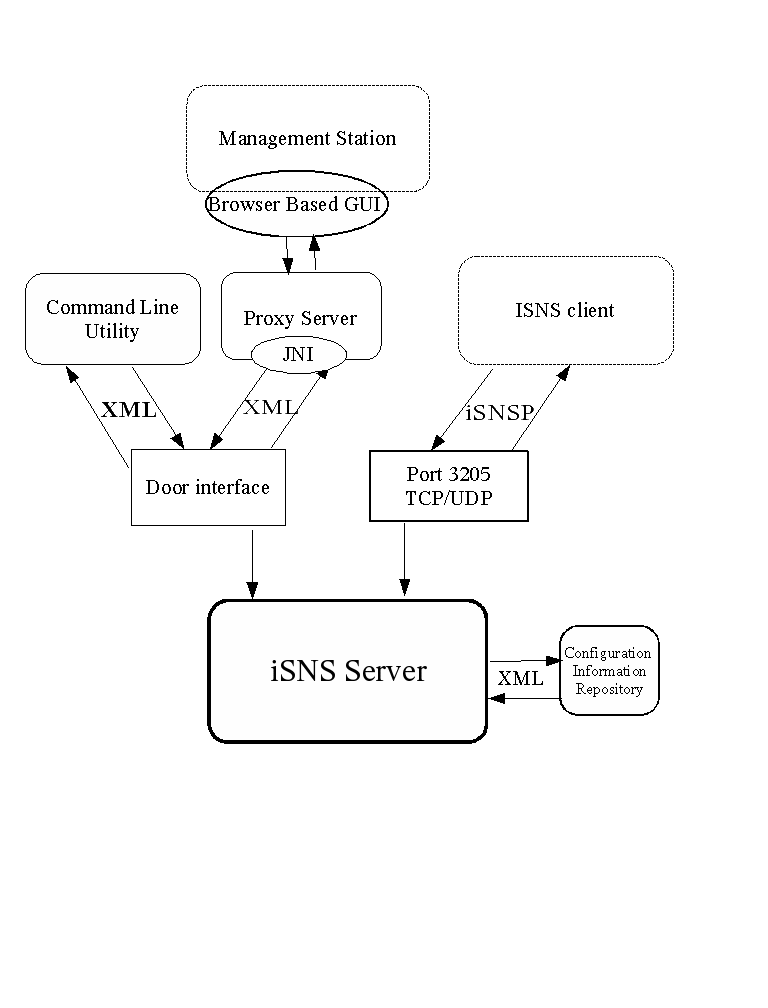
Major
components of this project are a server daemon, a command line
utility(CLI) and a Browser based GUI interface(BUI).
The
server daemon handles iSNS protocols through port 3205 as defined in
RFC4171 and also provides a door interface that management
applications can access and administer iSNS configuration data.
The
CLI and BUI allow various administrative tasks by communicating
through a door interface that is provided for management application
by the server. The CLI and the Web Service Proxy for BUI that talks
to the server will reside in the same system as the server.
The
format of data transport between the server and CLI/BUI will be XML
based. An XML schema will be developed for iSNS objects and
associated operations.
Server
uses a file to store for iSNS client attributes and configuration
data.
The
diagram shows the overall architecture of the components.
4. Technical details
4.1 Server Management
4.1.1
Administration
The
iSNS Server will be defined as a service under Solaris Service
Management Facility(SMF) which provides infrastructure to manage
persistently running applications. The server runs as a daemon when
the service is enabled during the system boot-up or through SMF
service management. The associated SMF service is disabled by
default. The SMF will also be used to manage administrative settings.
Any modification to the settings will require the associated service
to be refreshed.
4.1.1.1 Service Manifest
A
service manifest will be provided in the delivery of iSNS Server
package according to the requirement of SMF. The service manifest is
the definition of the service bundle of the iSNS Server. It contains
a list of elements for service properties, dependencies, execution
methods and so on. The manifest is an XML file which follows the DTD
of SMF and will be imported to SMF service repository during the
installation of the iSNS Server package.
The
service manifest will contain the definition of the service bundle:
<service_bundle
type='manifest' name='SUNWisnssvr:isns_server'>.
The
service attributes will be defined as:
name
= “network/isns_server”
type
= “service” and
version
= “1”,
the
service will have only a single instance.
The
iSNS Service will require full file system access and network name
resolution.
The
exec_methods that we will provide include
start
method: it is to start the service by executing the iSNS Server
daemon program.
stop
method: it is to stop the service by sending the signal SIGKILL.
refresh
method: it is to inform the service to reload the configuration by
sending signal SIGHUP.
4.1.1.2 Service
Properties
There
will be a property group for administratively controlled settings
defined in section 2.4 of RFC 4171 and other implementation choice
setting.
data
store location: default /etc/isns/isnsdata.xml(refer to section Data
Store for Configuration Information);
ESI
retry threshold, default value is 3;
Management
SCNs, enabled by default(relevant only if control node is enabled);
Default
DD/DDS, disabled by default;
DD/DDS
Modification for a) Control Node, b) iSCSI Target Node Type, c) iSCSI
Initiator Node Type, enabled for a) and disabled for others by
default;
Authorized
Control Nodes. Default is “-” to indicate an empty
string.
The
svcadm(1M) and svccfg(1M) commands are used to manage iSNS server
SMF service and associated properties. Also libscf(3LIB)
interfaces will be used to read in the administrative settings of
the server.
4.1.1.3 Service Security
Solaris
Role Based Access Control(rbac(5)) profile iSNS management will be
created along with solaris.smf.manage.isns and
solaris.smf.modify.isns authorities to let the iSNS service managed
under RBAC scheme.
4.1.2
Control Node and Management Application Support
The
RFC 4171 describes a control node as an entity to create or delete
discovery domain, to register a management SCN and to be endowed with
access to all iSNS database records. It is identified through iSCSI
name as described administratively controlled setting 'Authorized
Control Nodes' but no credential based authentication method is
specified in the RFC. Considering that the node name can be snooped,
name validation based authentication represents a security risk.
IPSec is mentioned for the security matters but IPsec is deployed at
the IP layer so once a connection is made to the server there is no
mechanism to securely associate a connection with a control node
other than name validation.
The
project will allow a control node through administrative controlled
settings defined in section 2.4 of RFC 4171. But project provided
management applications won't be implemented as such even though they
provide control node functionality. Instead, the server will provide
a door interface to support CLI and local proxy server for BUI and
apply Solaris Role Based Access Control(RBAC) using door_ucred(3DOOR)
to check the credential of the calling process.
4.1.3
Data Model for Management Application
iSNS
defined objects/attributes and associations will be communicated to
CLI and BUI management applications through XML data. The XML
modeling includes elements for Discovery Domain Set, Discovery Domain
and Node objects and enumerate, createModify, delete, get,
getAssociated operations. The XML schema isnsmgmtSchmea.xsd
provides details.
4.2 Server Operations
The
server will be running as a daemon with the following implementation.
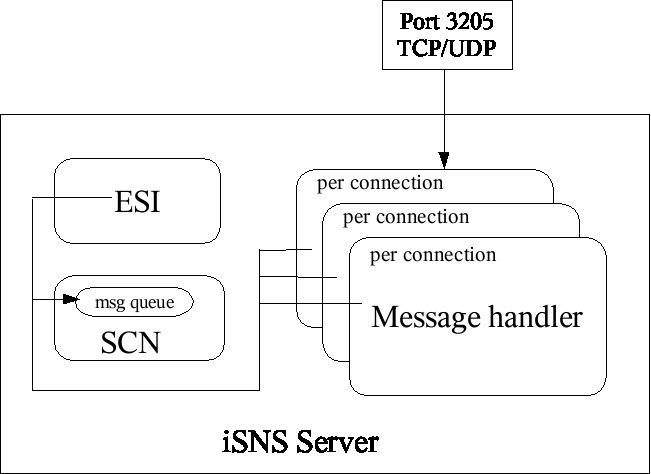
There
will be three main threads comprised in the server for iSNS client
support. One is per connection of the message handler which
responses for receiving clients' request, handling the request and
transmit the result to the clients. One is for State Change
Notification which generates SCN messages based on the network
events and transmit the messages to the corresponding clients. The
third one is for ESI, which polls the clients' status for their
presence.
The
door interface for the CLI and BUI management applications will be
served through another thread.
When
iSNS Server is being started, the iSNS Server loads all of discovery
domain information from the stored configuration information and
keep the information in memory while the server is running. The
server updates the configuration information repository when there
is a change happening in discovery domain or discovery domain set.
When a non-control node client registers its existence in the
server, the server will find any discovery domain(s) for which this
client belonged to previously, and scope to those discovery
domain(s) when the client queries device information from the
server. If no previous association with the server exist, the
client will be put into the default Discovery Domain.
iSNS
Server binds to the well known port 3205 at its startup and will
listen on that port during the server is running. iSNS transmits
data in packet data units (PDUs). One or more PDUs make up one iSNS
message. Server performs certain operations and send back the result
to the client based on the message types that are defined in RFC
4171.
The
communication method among these threads is by the use of message
queue. When a device registers or deregister its existence with the
server, or ESI detects a device being offline, a message is sent to
the SCN generator, therefore SCN generator generates a message and
sends the message to corresponding devices. The message is sent to
the SCN thread in one-way direction, one message queue is only used
for the communication.
Mutex is
used as locks for accessing discovery domain information by these
three threads.
The diagram
of the internal architecture for handling a iSNS client is shown
below.
4.2.1
Required iSNS Commands and Response Messages
The
following table provides an overview of iSNSP messages for the client
support. Note that control node related messages are supported only
if the control node operation is enabled through the administrative
setting.
-
|
Message Type
|
Description
|
Response
Message
|
|
DevAttrReg
(0x0001)
|
Provide the
means for iSNS to update existing objects or registering new
objects.
|
DevAttrRegRsp
(0x8001)
|
|
DevAttrQry
(0x0002)
|
Provide an
iSNS client with the means to query the iSNS server for object
attributes.
|
DevAttrQryRsp
(0x8002)
|
|
DevGetNext
(0x0003)
|
Provide an
iSNS client with the means to retrieve each and every instance
of an object type exactly once.
|
DevGetNextRsp
(0x8003)
|
|
DevDereg
(0x0004)
|
This message
is used to remove object entries from the iSNS database.
|
DevDeregRsp
(0x8004)
|
|
SCNReg
(0x0005)
|
This message
allows an iSNS client to register a Storage Node to receive
State Change Notification (SCN) messages.
|
SCNRegRsp
(0x8005)
|
|
SCNDereg
(0x0006)
|
This message
allows an iSNS client to stop receiving SCN messages.
|
SCNDeregRsp
(0x8006)
|
|
SCNEvent
(0x0007)
|
This message
is sent by an iSNS client to request generation of a SCN
message by the iSNS server.
|
SCNEventRsp
(0x8007)
|
|
SCN (0x0008)
|
This message
is generated by iSNS server, notifying a registered Storage
Node of changes.
|
SCNRsp
(0x8008)
|
|
DDReg (0x0009)
|
This message
is used to create a new Discovery Domain (DD), to update an
existing DD Symbolic Name and/or DD Features attributes, and to
add DD members.
|
DDRegRsp
(0x8009)
|
|
DDDereg
(0x000A)
|
This message
allows an iSNS client to deregister an existing Discovery
Domain (DD) and to remove members from an existing DD.
|
DDDeregRsp
(0x800A)
|
|
DDSReg
(0x000B)
|
This message
allows an iSNS client to create a new Discovery Domain Set
(DDS), to update an existing DDS Symbolic Name and/or DDS
Status, or to add DDS members.
|
DDSRegRsp
(0x800B)
|
|
DDSDereg
(0x000C)
|
This message
allows an iSNS client to deregister an existing Discovery
Domain Set (DDS) or to remove some DDs from an existing DDS.
|
DDSDeregRsp
(0x800C)
|
|
ESI (0x000D)
|
This message
is sent by the iSNS server, and is used to verify that an iSNS
client Portal is reachable and available.
|
ESIRsp
(0x800D)
|
4.2.2 Object and Attributes
The
iSNSP registration and query message PDU Payloads contain a list of
attributes which are separated to source attribute, message key
attribute(s) and operating attribute(s).
The
following table lists the attributes for each type of object that the
server supports.
-
|
Object
|
Attribute
|
Description
|
|
NETWORK ENTITY
|
Entity
Identifier
|
This is a key
attribute that uniquely identifies each Network Entity
registered in the iSNS server.
|
|
|
Entity
Protocol
|
This attribute
indicates the block storage protocol used by the registered
NETWORK ENTITY.
|
|
|
Management IP
Address
|
This attribute
contains the IP address that may be used to manage the Network
Entity and all Storage Nodes contained therein via iSNS MIB.
|
|
|
Timestamp
|
This field
indicates the most recent time of message handling related to
the Network Entity.
|
|
|
Protocol
Version Range
|
This field
contains the minimum and maximum version of the block storage
protocol supported by the Network Entity.
|
|
|
Registration
Period
|
This field
indicates the maximum period, in seconds, that the registration
will be maintained by the server without receipt of any message
from the client that registers the Network Entity.
|
|
|
Entity Index
|
This index
uniquely identifies each Network Entity registered in the iSNS
server.
|
|
PORTAL
|
IP Address
|
This is a key
attribute that contains the IP address of the Portal which a
Storage Node can transmit and receive storage data.
|
|
|
TCP/UDP Port
|
This is a key
attribute that indicate TCP/UDP port of the Portal which a
Storage Node can transmit and receive storage data.
|
|
|
Portal
Symbolic Name
|
This attribute
is a user-readable description of the Portal entry in the iSNS
server.
|
|
|
ESI Interval
|
This field
indicates the requested time, in seconds, between Entity Status
Inquiry messages sent from the iSNS server to this Network
Entity.
|
|
|
ESI Port
|
This field
contains the TCP or UDP port used for ESI monitoring by the
iSNS server at the Portal IP Address.
|
|
|
Portal Index
|
This index
uniquely identifies each Portal registered in the iSNS
database.
|
|
|
SCN Port
|
This field
contains the TCP or UDP port used by the iSNS client to receive
SCN messages from the iSNS server.
|
|
|
Portal
Security Bitmap
|
This field
contains flags that indicate security attribute settings for
the Portal.
|
|
PORTAL GROUP
|
PG iSCSI Name
|
This is the
iSCSI Name for the iSCSI Storage Node that is associated with
the PG object.
|
|
|
PG IP Address
|
This is the
Portal IP Address attribute for the Portal that is associated
with the PG object.
|
|
|
PG TCP/UDP
Port
|
This is the
Portal TCP/UDP Portal attribute for the Portal that is
assoicated with the PG object.
|
|
|
PG Tag
|
This field is
used to group Portals in order to coordinate connections in a
session across Portals to a specified iSCSI Node.
|
|
|
PG Index
|
This index
uniquely identifies each PG object registered in the iSNS
database.
|
|
STORAGE NODE
|
iSCSI Name
|
This attribute
is used to uniquely identifies a Storage Node object, it is
unique across the entire database.
|
|
|
iSCSI Node
Type
|
This field is
a bitmap indicating the type of iSCSI Storage Node, the types
are: Control, Initiator or Target.
|
|
|
Alias
|
This field is
a user-readable description of the Node entry in the iSNS
server.
|
|
|
iSCSI SCN
Bitmap
|
This SCN
bitmap indicates events for which the registering iSNS client
wishes to receive a notification message.
|
|
|
iSCSI Node
Index
|
This index
uniquely identifies each iSCSI Storage Node registered in the
iSNS database.
|
|
DISCOVERY
DOMAIN
|
DD ID
|
The DD ID is
an unsigned non-zero integer identifier used in the iSNS
directory database as a key to identify a Discovery Domain
uniquely.
|
|
|
DD Symbolic
Name
|
This name
uniquely identifies a Discovery Domain.
|
|
|
DD Member
iSCSI Node Index
|
This is the
iSCSI Index of a Storage Node that is a member of the DD.
|
|
|
DD Member
iSCSI Name
|
This field
indicates membership for the specified iSCSI Storage Node in
the Discover Domain.
|
|
|
DD Member
iSCSI Portal Index
|
This field is
an alternative representation for Portal membership to the
Portal IP Address and Portal TCP/UDP Port.
|
|
|
DD Member
Portal IP Address
|
This attribute
and the Portal TCP/UDP Port attribute indicate membership in
the Discovery Domain for the specified Portal.
|
|
|
DD Member
Portal TCP/UDP
|
This attribute
and the Portal IP Address attribute indicate membership in the
Discovery Domain for the specified Portal.
|
|
|
DD Features
|
The Discovery
Domain Features is a bitmap indicating the features of this DD.
|
|
DISCOVERY
DOMAIN SET
|
DDS Identifier
|
The DDS ID is
an unsigned non-zero integer identifier used in the iSNS
directory database as a key to indicate a Discovery Domain Set
uniquely.
|
|
|
DDS Symbolic
Name
|
This is a
user-readable field used to assit a network administrator in
tracking the DDS function.
|
|
|
DDS Status
|
This field is
a 32-bit bitmap indicating the status of the DDS.
|
4.2.3 Status Code
The
iSNSP response message PDU Payloads contain a Status Code followed by
a list of attributes. The following is the return code that the
server will use. It is defined in RFC4171 section 5.4.
-
|
Status Code
|
Status
Description
|
|
0
|
Successful
|
|
1
|
Unknown Error
|
|
2
|
Message Format
Error
|
|
3
|
Invalid
Registration
|
|
5
|
Invalid Query
|
|
6
|
Source Unknown
|
|
7
|
Source Absent
|
|
8
|
Source
Unauthorized
|
|
9
|
No Such Entry
|
|
10
|
Version Not
Supported
|
|
11
|
Internal Error
|
|
12
|
Busy
|
|
13
|
Option Not
Understood
|
|
14
|
Invalid Update
|
|
15
|
Message Not
Supported
|
|
16
|
SCN Event
Rejected
|
|
17
|
SCN
Registration Rejected
|
|
18
|
Attribute Not
Implemented
|
|
22
|
Invalid
Deregistration
|
|
23
|
Registration
Feature Not Supported
|
4.3 Backup Server Solution
Sun
Cluster will be used as as a backup server solution, creating
multiple physical iSNS servers to form a single logical iSNS server
cluster as described in section 2.8 of RFC 4171. The data store for
configuration information will be placed in a cluster file system to
let multiple cluster nodes share data.
With
Sun cluster scalable data service, one node hosts the physical
interface to the cluster. This node is called a Global Interface
(GIF) Node. Multiple GIF nodes can exist in the cluster. Each GIF
node hosts one or more logical interfaces that can be used by
scalable
services. These logical interfaces are called global
interfaces. One GIF node hosts a global interface for all
requests
for a particular application and dispatches them to multiple nodes on
which the application server
is running. If the GIF node fails,
the global interface fails over to a surviving node. When a failover
occurs, a new Address Resolution Protocol (ARP) packets are generated
and broadcast to the world. These ARP packets contain the new MAC
address (of the new physical adapter to which the node failed over)
and the old IP address. When another machine on the network receives
one of these
packets, it flushes the old MAC-IP mapping from its
ARP cache and uses the new one.
When
Sun cluster is deployed, the SMF framework based administration
described in section 4.1.1 is not feasible since SMF is not cluster
aware. Instead, Sun cluster start facility will start the iSNS
through its resource group framework. This means that the admin needs
to feed iSNS configuration prop to the cluster and the cluster start
facility will get those data and pass them when it starts iSNS
server. The iSNS server will be implemented such that its start
routine check if the administrative settings are given as start
arguments and if they are, it will skip to call libscf.
Procedural
details on Sun cluster based operations will be provided later.
4.4 Data Store for Configuration
Information
The
server settings and the client configuration information will be
stored in a flatfile with XML format. The default location will be
/etc/isns/isns.xml. The file can be administratively specified by
modifying the data store location prop of iSNS SMF service. When the
file doesn't exist the server will create one. If it does exist, the
server will check certain things like warning message for manual edit
and the content of file at loading time. If any kind of failure is
detected, the server will get terminated. In a longer term, a
framework to take a plugin module that handles data store with its
own access method will be provided. That will allow 3rd
party vendors to apply its own data store solution.
4.5 Server Discovery
The
DHCP based discovery will be supported for the server. RFC 4174 iSNS
option will be configured through /etc/dhcp/inittap(dhcp_inittab(4))
and dhtadm(1M)/dhcpmgr(1M). Also static discovery, i.e., manually
specifying the IP address of the server would work as most of clients
provide an interface to accept it today.
4.6 User Interface
The
specification of CLI isnsadm is provided in a separate document,
iSNS-CLI-Design.pdf file. Solaris Lockhart based BUI component will
be provided in the future.
5. Interfaces
-
|
Name
|
Level
|
Comments
|
|
/usr/sbin/isnsadm
Response
Label
Data
Filed
Error
messssage
|
Committed
Uncommitted
Uncommitted
Uncommitted
|
iSNS
Server CLI.
|
|
/etc/isns/isnsdata.xml
|
Project
private
|
Default
iSNS data store for configuration information
|
|
/var/run/isns_server_door
|
Project
Private
|
A file
for door interface
|
Imported
Interfaces
-
|
Name
|
Level
|
Comments
|
|
IETF RFC
4171
|
Standard
|
|
|
libscf
|
Evolving
|
|
|
libdoor
|
Evolving
|
|
References