Snapshot Manager Design
The snapshot manger will be based on the work done by Tim Foster for his
Auto Snapshot Scheduler including some necessary modifications to support the default operational behaviour we are planning.
Tim has been kind enough to assist us as time permits with this task and to provide guidance in determining the design of the snapshot manager.
Behavioural Overview
The snapshot manger's primary purpose is to enable automatic ZFS snapshots to be taken for the user. The goal is to have this "just work" and require minimal initial user configuration apart from deciding whether they want it on or off. The snapshot manager will provide a sensible default configuration which the user is not required to configure in any way.
Snapshot Schedule
The default snapshot taking policy will be roughly:
- Hourly snapshots taken once every hour, keeping the 24 most recent hourly snapshots.
- Daily snapshots taken once every 24 hours, keeping the 31 most recent daily snapshots.
- Weekly snapshots taken once every 7 days, keeping the 12 most recent weekly snapshots.
- Monthly snapshots taken on the first day of every month, keeping the 12 most recent monthly snapshots.
The above schedule is an initial proposal which aims to provide a balance between retaining a reasonable duration
of available snapshots, but without having to keep an unreasonably large number of snapshots, with more granularity
and frequency for recent snapshots. Apple's Time Machine adopts a similar backup scheduling policy. Therefore from a GUI perspective the configuration will amount to no more than a radio button indicating whether the snapshot manager should be enabled or not. Power users who wish to customise the default policy may do so by modifying the SMF service properties for the hourly, daily, weekly or monthly schedules. For Opensolaris 2008.11, we do not plan to provide a GUI providing this additional level of scheduling configuration. This may be planned for a subsequent Opensolaris release if deemed necessary.
Offline Considerations
For laptop users and many workstation users, the usage pattern is unpredictable. The system:
- will have frequent power cycles
- May spend long periods of time in a powered off state
- May unexpectedly lose power (battery or mains power dies)
- May not get powered on and off at consistent times.
This means that snapshots may not get taken and the scheduled times because the system was powered off. This is especially true for less frequent snapshots such as daily, weekly and monthly snapshots. This creates a very high risk of large gaps in the timeline of available snapshots. In order to deal with this, the snapshot service will also do some additional checking on startup. For example, in the case of monthly snapshots: If on startup, the snapshot manager notices that the last monthly snapshot is more than a month old (eg. 40 days) then it will immediately take one monthly snapshot and schedule future monthly snapshots as normal in the crontab. The same applies for all other regularly scheduled snapshots.
What Gets Snapshotted?
By default a recursive snapshot will be taken of the entire root filesystem (rpool/) and it's child filesystems (rpool/
export, rpool/export/home etc.) This should be fine for most users. On a typical Opensolaris system this would result
in snapshots being taken of:
- rpool
- rpool/ROOT
- rpool/ROOT/<Boot Environment name>
- rpool/ROOT/<Boot Environment name>/opt
- rpool/export
- rpool/export/home
Under certain circumstances involving filesystems which experience a lot of churn on large files (eg. a folder for regular downloading of DVD iso images or bit torrent downloads) and with limited disk space, snapshots may start using excessive amounts of disk space referencing deleted ISO images etc. and may not represent data that the user wishes to keep backed up. In such circumstances the power user can elect to opt for manually specified, non recursive snapshot taking to ensure that snapshots are not taken for the zfs filesystem which the user does not wish to have snapshotted. Additionally, the user could create a unique ZFS filesystem specifically for ISO images or torrents and exclude it from ZFS snapshot management eg:
rpool/export/home/jack/Downloads/BitTorrent
Configuration GUI
The GUI's tasks are to allow the user to configure the snapshot service and to display the
existing configuration state of the service.
The GUI will have two modes of operation:
- Basic mode: Will be a simple on/off proposition to enable or disable the service.
- Advanced mode: Will allow the advanced user to exclude selected filesystems from the auto snapshot service.
Basic Mode GUI
- Snapshot configuration GUI in basic mode:
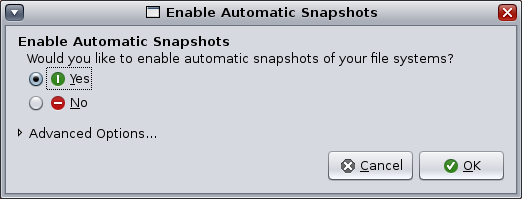
The basic mode will be the interface that the user initially sees when the GUI is invoked.
The goal here is to keep things as simple as possible and avoid initial information overload.
An expander arrow for advanced configuration options will expand the GUI dialog and present
the advanced configuration options.
Defaults:
- Display the current state of the auto-snapshot service. Enabled = Yes Disabled = No
- Advanced Options are hidden unless the user previously configured the service with
non default snapshotting options (ie. excluded some filesystems from snapshotting)
Advanced Mode GUI
- Snapshot configuration GUI with advanded options expanded:
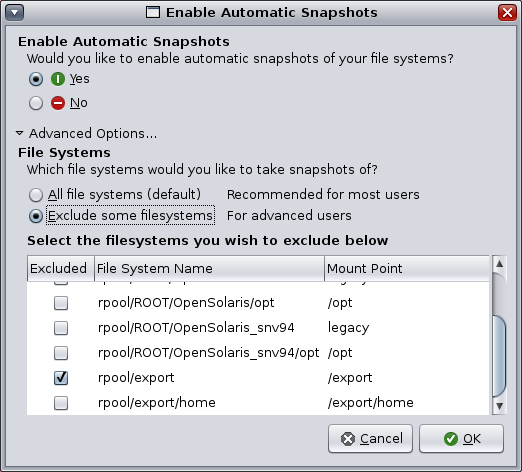
The advanced mode allows the user to choose either a default snapshot configuration which
snapshots all ZFS filesystems (a recursive snapshot from rpool/ downwards). This should
be suitable for most users who just want the thing to work.
The other option allows users to specify filesystems that they wish not to have snapshotted.
This might be desirable for advanced users who frequently download and delete large files
such as ISO images or bit torrent downloads. (The user may want to create a separate file system
for such files but that's beyond the initial scope of this project for 2008.11)
Defaults:
- Display the current state of filesystem configuration.
- If the service is configured to snapshot all filesystems then the "All filesystems" radio button will be active and the filesystem list view will be in an insensitive state (no user input allowed).
- If the user has customised the service to exclude certain filesystems from being snapshotted then the "Exclude Some File Systems" radio button will be active and the filesystems that have been excluded will be indicated by an activated check box in the list of filesystems displayed beneath.
- Selecting the "All filesystems" radio button will override any previous filesystems the user may have selected to be excluded from snapshotting, but the excluded filesystems will be displayed in an insensitive state.
Interface table for GUI
The GUI will need a set of interfaces to the auto-snapshot service to query and set the following configuration
properties:
Packages
To try out the snapshot management, download, untar and install the packages in the following order:
Once installed, access the configuration from the panel menu: System->Administration->Time Slider Setup
--
NiallPower - 09 Sep 2008

 SnapGUI-Basic.png
  SUNWtime-slider-pkgmap
  arc.txt
  cteam.txt
